
Tool progress messages
A tool can play progress messages to the caller while it runs, keeping the caller engaged during slow tool calls and confirming the outcome. These are configured on the Progress tab of the tool editor.
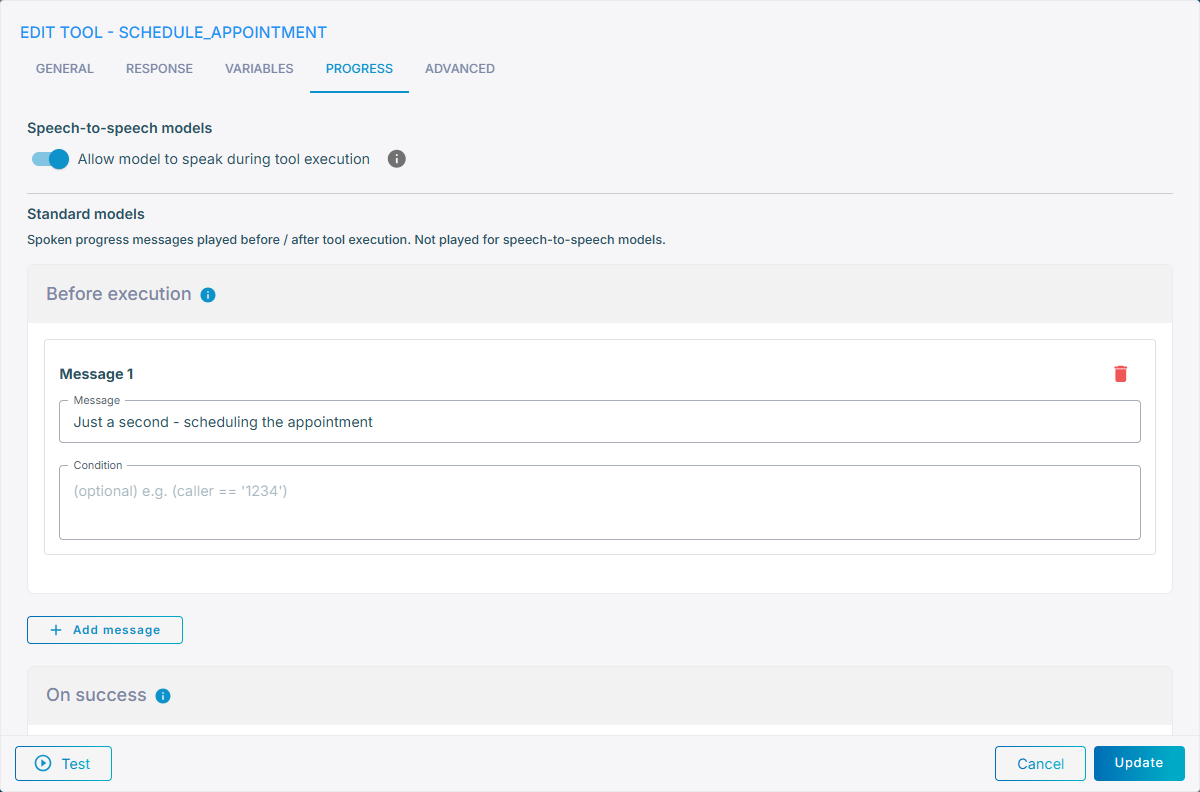
This page covers messages defined per tool. To play a single time-based message whenever the agent is slow to respond (regardless of which tool runs), use the agent-level Progress message setting described in Progress and error messages.
Standard models
For standard (non-speech-to-speech) models, a tool can speak messages at three stages of the tool call:
| Stage | Played when |
|---|---|
| During execution | The tool is about to run (for example, “Let me check that for you…”). |
| On success | The tool completed successfully (for example, “Got it — found your order.”). |
| On failure | The tool failed (for example, “Sorry, I’m having trouble reaching the system.”). |
The During execution message is skipped when the model delivered its own message alongside the tool call in the same response (for example, “Let me check that for you.” together with the tool call) — that message already fills the wait. On success / On failure still play, and a different tool called later in the same turn still plays its own During execution message. Whether the model's message reaches the user (and so triggers this) depends on llm_message_with_tool_call and TTS streaming; see how progress messages interact with the model's own speech for the full picture, including the call-control exception.
For each stage, click Add message and configure:
- Message – the text to speak. It may reference
{...}variables — for example,Checking order {order_id}…. - Condition – an optional condition, using the expression syntax, evaluated against the current agent / flow variables — for example,
(caller == "1234").
Each stage may hold multiple messages. Among the messages whose condition is empty or evaluates to true, one is picked at random and spoken. This lets you vary the wording, or speak a different message per language or per caller:
"progress_messages": {
    "before": [
        { "text": "Let me check that for you…" }
    ],
    "success": [
        { "text": "¡Listo!", "condition": "(language == 'es')" },
        { "text": "Got it — found your order." }
    ],
    "failure": [
        { "text": "Hmm, I'm having trouble reaching the system." }
    ]
}
Letting the model write the message
Instead of pre-defined During execution text, which repeats verbatim and cannot describe the work in hand, you can have the agent generate that line dynamically from the state of the conversation: set During execution to Dynamic (generated by model) and the model composes a short spoken sentence for the call it is about to make. It knows which values it is calling the tool with, so the sentence can be specific - "Checking what's free Tuesday afternoon" rather than "Let me check that for you" - and it varies the wording between calls. What the tool itself receives does not change.
When it is on:
- it replaces the During execution messages. Anything configured there is kept and used again if you turn it off.
- On success / On failure are unaffected - they report the outcome, not the wait.
Sound during execution
Sound during execution plays audio to the caller — hold music or an office typing sound — for as long as the tool runs. It belongs to the same During execution stage as the message above, and is intended for tools that take a long time to answer, where a spoken message covers only the first moments of the wait:
| Option | |
|---|---|
| None | Default — no sound. |
| Typing 1, Typing 2 | Keyboard typing, as if someone is looking your request up. |
| Hold Music 1 – Hold Music 4 | Hold music. |
The sound starts as soon as the caller is not being spoken to — immediately when the tool has no During execution message, or the moment that message has been spoken in full — and it keeps playing until the agent has something to say, so the caller is not left in silence while the answer is being prepared — it stops before the On success / On failure message, or before the answer itself when there is no such message. A During execution message and the sound work together: the message is spoken first, and the sound follows it, never over it.
The sound is not played for speech-to-speech models.
Background tools. When the tool runs in the background (the Wait for response toggle on the Response tab is off), only the During execution message is played, and no sound — the agent does not wait for a result, so there is no execution to play a sound over and no outcome for the success and failure messages to report.
Speech-to-speech models
Progress messages above are not played for speech-to-speech models. Instead, speech-to-speech models use the Allow model to speak during tool execution toggle:
On(default for tools created from now on) – the model keeps talking and can call other tools while the tool runs in the background; the tool's result is folded into the conversation when it is ready.Off– the model waits for the tool to finish before responding.
This setting applies to custom tools only. To preserve their existing behavior, tools created before this option was introduced default to Off.